




Frequently Asked Questions
Importing existing VPN Connections from your Mac
Importing a pre-existing VPN connection from your Mac to use in VPN Tracker 365 is straightforward.
Open the VPN Tracker 365 app, then go to File > Import > System VPN Connections.
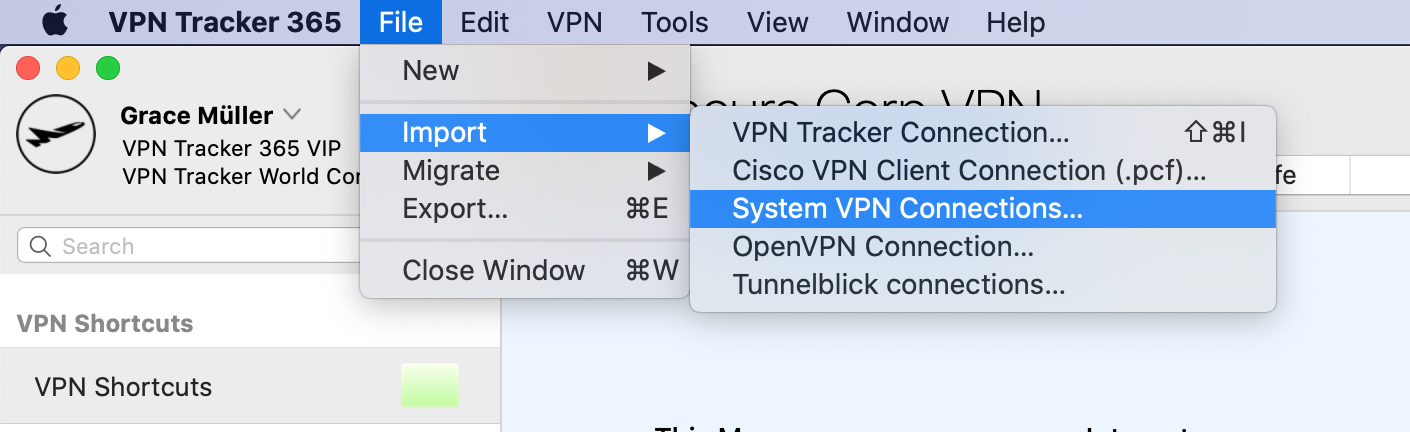 VPN Tracker will scan your Mac for VPN connections that are compatible with VPN Tracker 365. You can then select and import the connections you want.
Please note that only compatible connections can be imported.
VPN Tracker will scan your Mac for VPN connections that are compatible with VPN Tracker 365. You can then select and import the connections you want.
Please note that only compatible connections can be imported.
VPN Tracker will scan your Mac for VPN connections that are compatible with VPN Tracker 365. You can then select and import the connections you want.
Please note that only compatible connections can be imported.