Frequently Asked Questions
VPN Tracker has three settings that can speed up connecting to Cisco devices and improve compatibility.
- Establish a shared tunnel to 0.0.0.0/0 for split-tunneling
- Send Cisco firewall attribute
- Use ... as the application version during Mode Config
Note: All settings described on this page require VPN Tracker 6.2 or newer.
Establish a shared tunnel to 0.0.0.0/0 for split-tunneling
What does this setting do?
In a split-tunneling setup using EasyVPN, VPN Tracker will no longer establish an IPsec Security Association (SA) to each remote network, but establish a single SA to 0.0.0.0/0. Split-tunneling is achieved only through an appropriate routing setup. This can speed up the connection processes significantly for connections with multiple remote networks.
When should I use this setting?
The setting works with most Cisco devices that use EasyVPN and a split-tunneling setup.
How can I try it?
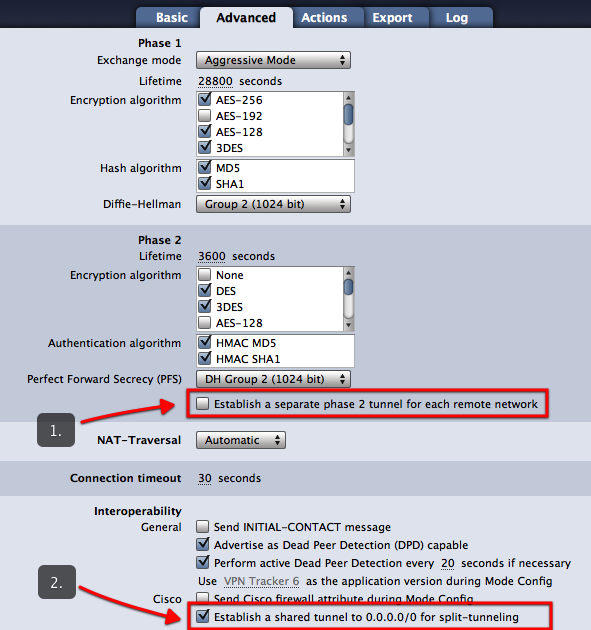
- On the Advanced tab, uncheck the box “Establish a separate tunnel for each remote network” (see screenshot)
- Make sure the box “Establish a shared tunnel to 0.0.0.0/0 for split tunneling” is checked (see screenshot)
If your connection does not work with this new setting, simply revert back to your previous setup by checking the box “Establish a separate tunnel for each remote network”.
Send Cisco firewall attribute
What does this setting do?
This setting causes VPN Tracker to send a special attribute during EasyVPN indicating the presence of a firewall.
When should I use this setting?
You can try enabling this setting if your current EasyVPN-based connection to a Cisco device gets dropped at phase 2 (“The VPN gateway asked VPN Tracker to disconnect...” error).
Use ... as the application version during Mode Config
What does this setting do?
This setting causes VPN Tracker to send a different application version than the default “VPN Tracker 6” during EasyVPN and Mode Config.
When should I use this setting?
You can try setting a different application version, e.g. “Cisco Systems VPN Client 4.8.0:Linux” if your current EasyVPN-based connection to a Cisco device gets dropped at phase 2 (“The VPN gateway asked VPN Tracker to disconnect...” error).