

Store
 

Can I add WeVideo videos to my Mail Designer 365 email te... - KH1491

Frequently Asked Questions

Can I add WeVideo videos to my Mail Designer 365 email template?
 
Yes, you can add WeVideo videos into your email design using Mail Designer 365. Follow these simple steps:
‣ Add a layout block with an image area.
‣ In the "Contents" tab, click on the "Video Placeholder" icon. You can also press Command-5.
FAQ Image - S_908.png
‣ Drag a video placeholder into an image area.
FAQ Image - S_909.png
‣ Paste your WeVideo link into the "Link to Video" field. 
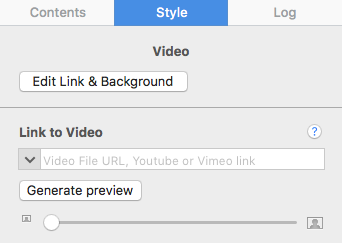
FAQ Image - S_910.png

Keep in mind:

Unlike YouTube or Vimeo videos, generating preview images from WeVideo videos is not directly supported by Mail Designer365. You will have to provide your own preview image by taking a screenshot of the video frame you want to use as the preview image. Then drag that image onto the video placeholder. Or you can choose an image of your choice as the preview image. In the email newsletter, the videos that you add are treated as images with a link to the video page. Direct inline playback is no longer supported by Mail Designer 365 because most email clients do not support it. Note: Please remember that Mail Designer 365 does not support embedding videos directly within your email designs.