




Frequently Asked Questions
How to resolve Personal Safe Errors
You can recognize a Personal Safe error by the yellow warning triangle next to a connection  This means that the local saved version of the connection does not match the version in the cloud. To resolve the conflict, click on the connection in the left menu and open the tab "Personal Safe"
Click on the button "Fix sync issue".
A dialogue will open. You have the option to choose which version of the connection you would like to keep. The local version, or the cloud version.
This means that the local saved version of the connection does not match the version in the cloud. To resolve the conflict, click on the connection in the left menu and open the tab "Personal Safe"
Click on the button "Fix sync issue".
A dialogue will open. You have the option to choose which version of the connection you would like to keep. The local version, or the cloud version. 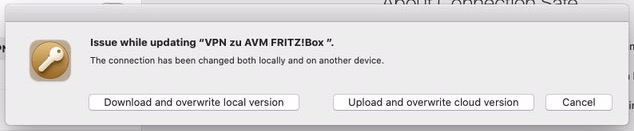 To keep the local version, please choose: "Upload and overwrite cloud version"
To keep the Cloud version please choose: "Download and overwrite local version"
To keep the local version, please choose: "Upload and overwrite cloud version"
To keep the Cloud version please choose: "Download and overwrite local version"
This means that the local saved version of the connection does not match the version in the cloud. To resolve the conflict, click on the connection in the left menu and open the tab "Personal Safe"
Click on the button "Fix sync issue".
A dialogue will open. You have the option to choose which version of the connection you would like to keep. The local version, or the cloud version.
To keep the local version, please choose: "Upload and overwrite cloud version"
To keep the Cloud version please choose: "Download and overwrite local version"