




Frequently Asked Questions
Where can I find my Mail Designer templates in Finder and Time Machine?
How to find your designs in a Time Machine backup
If you've had a hardware failure and need to find your templates in a backup of your Mac, you can find your templates in this location:
Note: there will be multiple "Library" folders on your harddrive, but you need the hidden one inside your Home folder.
Here is one way to get there:
Now here on, go to "Group Containers/C3HCD5RMD7.Mail Designer/Documents/MD365" to find your documents. You'll find folders corresponding to your categories and each will have subfolders "Contents/Resources" that have the actual documents.
You can drag & drop them onto your Mail Designer 365 icon in the dock to copy them to your Mail Designer 365 library.
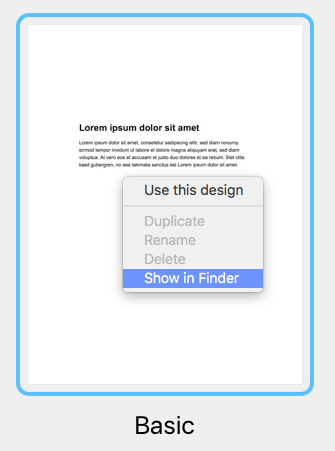
You can find your original template files in the Finder by following these steps:
‣ Right click the template in the Design Chooser
‣ Choose "Show in Finder"
How to find your designs in a Time Machine backup
If you've had a hardware failure and need to find your templates in a backup of your Mac, you can find your templates in this location:
/user/Library/Group Containers/C3HCD5RMD7.net.tower-one.MailDesigner
Note: there will be multiple "Library" folders on your harddrive, but you need the hidden one inside your Home folder.
Here is one way to get there:
- Navigate to your user's home folder in the Time Machine backup (e.g. "John")
- Right-click on your user's home folder ("John"), hold down the Alt/Option key (⌥) and select "Copy “john” as Pathname"
- Select the menu item "Go > Go to Folder…" and a dialog will open
- Press Cmd+V to paste the path you've just copied and add "/Library" to the end of the path and press enter
Now here on, go to "Group Containers/C3HCD5RMD7.Mail Designer/Documents/MD365" to find your documents. You'll find folders corresponding to your categories and each will have subfolders "Contents/Resources" that have the actual documents.
You can drag & drop them onto your Mail Designer 365 icon in the dock to copy them to your Mail Designer 365 library.