Frequently Asked Questions
When I copy & paste my images from Apple Pages, Mail Designer always tells me that they are low resolution.
Mail Designer is warning you that the images are low resolution because Apple Pages does not copy its images in retina quality.
To work around this, we recommend the following:
‣ In Apple Pages, double the size of your graphic. For example, if you had a shape that has the dimensions 100x100, please increase that to 200x200.
‣ Copy and paste it into an image area in Mail Designer.
‣  Then, select the image.
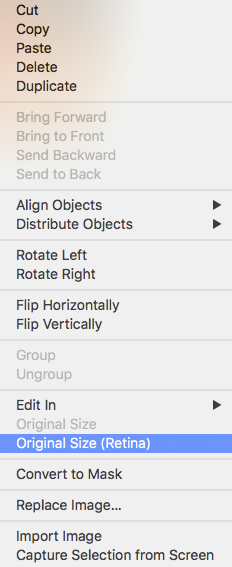
‣  Right-click (or Ctrl+click) on the image.
‣  Choose "Original Size (Retina)" from the drop-down menu. This automatically shrinks the image but becomes retina quality.