Frequently Asked Questions
How do I add emojis and symbols to my text in Mail Designer 365?
Mail Designer 365 supports special characters, which you can add to your text to create icons for call-to-action buttons or as a way to simplify your messages.
To add special characters:
‣ Open your email template if it is not already opened.
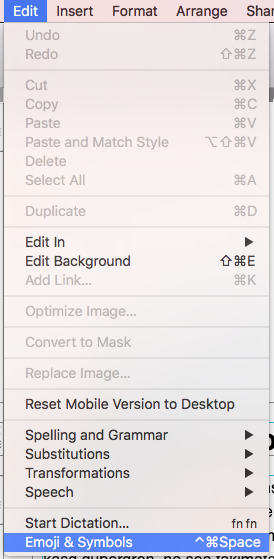
‣ Choose “Edit" > "Emoji & Symbols”
You have different options from different categories like emojis, arrows, bullet points, stars, currency symbols, latin alphabet, trademark symbols, other letterlike symbols, math symbols, parentheses, pictographs, and punctuations. Please refer to the following page for more information on how to add emojis and special characters in Mail Designer 365: