




Frequently Asked Questions
I updated VPN Tracker and my connection has stopped working
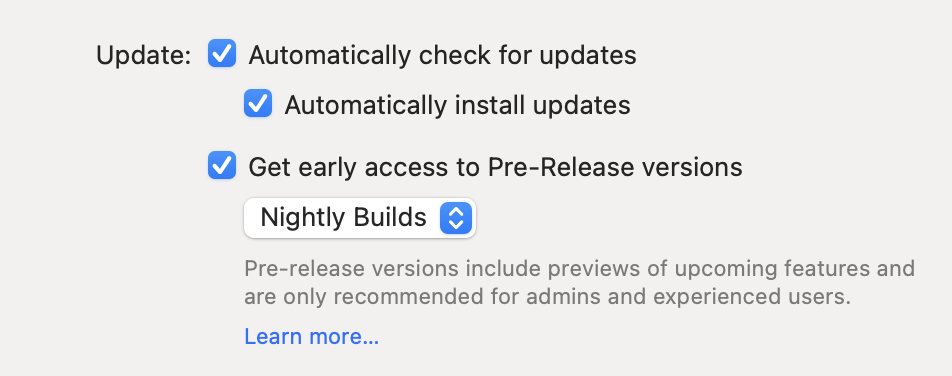
Please go to VPN Tracker > Preferences and check if you have activated pre-release testing. If you have installed a Nightly or Beta build, it is possible you may encounter some connectivity issues, as these versions are still in the development stages.
 I am having issues with a pre-release version. What can I do?
Having issues? You can easily get back to the last stable release by visiting our version history overview and downloading the last full VPN Tracker version.
If you decide you want to deactivate pre-release testing for the future, you can do this in the app preferences.
Please note that pre-release testing is generally not advised for production systems or users who require critical access to their VPN.
Need further support?
If you need help with a certain connection issue, feel free to contact the support team. Remember to also send a TSR (technical support report.)
I am having issues with a pre-release version. What can I do?
Having issues? You can easily get back to the last stable release by visiting our version history overview and downloading the last full VPN Tracker version.
If you decide you want to deactivate pre-release testing for the future, you can do this in the app preferences.
Please note that pre-release testing is generally not advised for production systems or users who require critical access to their VPN.
Need further support?
If you need help with a certain connection issue, feel free to contact the support team. Remember to also send a TSR (technical support report.)
I am having issues with a pre-release version. What can I do?
Having issues? You can easily get back to the last stable release by visiting our version history overview and downloading the last full VPN Tracker version.
If you decide you want to deactivate pre-release testing for the future, you can do this in the app preferences.
Please note that pre-release testing is generally not advised for production systems or users who require critical access to their VPN.
Need further support?
If you need help with a certain connection issue, feel free to contact the support team. Remember to also send a TSR (technical support report.)