VPN Tracker Personal Safe is secure encrypted cloud storage for your personal VPN connections and shortcuts.
How to save a connection in Personal Safe
Not sure if your VPN connection is backed up? The safe icon in the connection list indicates whether a connection has been stored in your Personal Safe:
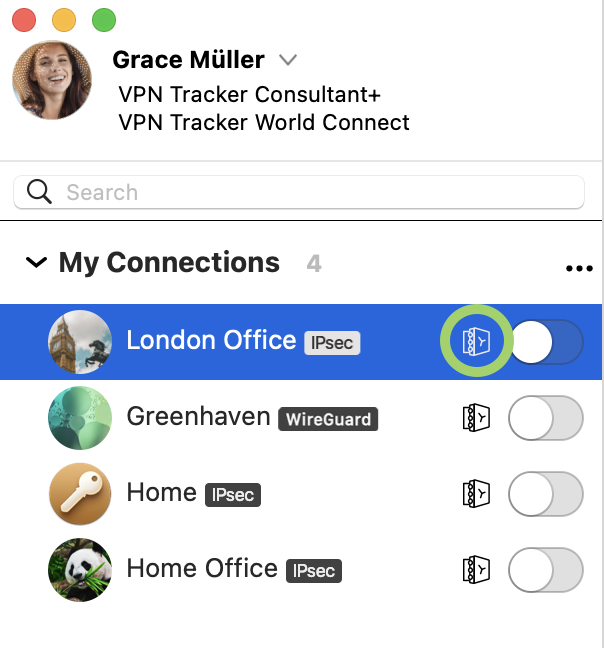
To add a connection to your Personal Safe, simply right click the connection and select 'Add to Personal Safe' for access across all your devices.

Why should I use Personal Safe?
VPN Tracker Personal Safe makes using VPN more reliable and secure:
Security
Personal Safe adds an additional level of security to your connections: all your connection details are encrypted using a highly-secure key (Argon3 + PKTNY) that only you can unlock.
Backup
Lost iPhone? Broken Mac? Personal Safe keeps your connections safe, so you can instantly get them on your replacement device. Sign in with your secure key and they are instantly downloaded and ready to go.
Use your connections on all your devices
iMac at home and iPad for the road? Your Personal Safe keeps your connections synced across all your devices – securely and effortlessly.
How are connections stored?
When you add a connection to your Personal Safe, it is encrypted using your personal encryption keys and then uploaded to a secure cloud storage location. It can only be accessed with your user credentials and encryption key.
Is Personal Safe secure?
Personal Safe has been designed from scratch for VPN connections. Unlike other storage systems that rely on passwords and leave files unencrypted, Personal Safe encrypts all your connections with keys that only you can use.
That means connections are
• Encrypted on your device and
• Stored on encrypted storage at my.vpntracker.com that only you can access
Even if someone could get access to your Personal Safe, the key-based security means they can't access the encrypted connection information without your password.
We've designed the system so no-one (including the VPN Tracker team) can access or unlock your connections.